
RoadReady
Safe Roads Alliance, Inc.Education
3.32.39K Reviews
- Version
- 3.4.13
- Installs
- 500.00K
- Age Rating
- Everyone
Screenshots
Our Review of RoadReady
 Analysis by Appyee
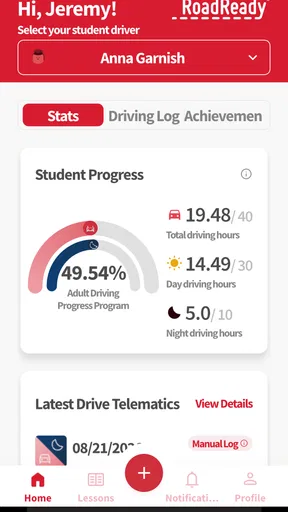
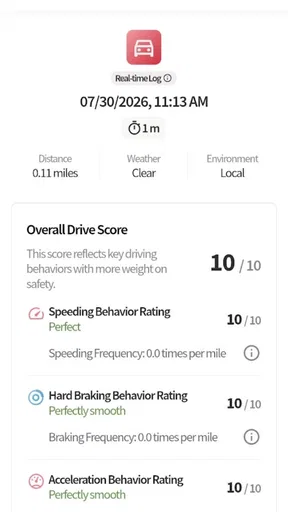
Learning to drive is not only about passing a test. It is about building enough repeatable practice that a new driver can make sensible decisions when traffic, weather, passengers, and unfamiliar roads add pressure. RoadReady is an education app from Safe Roads Alliance, Inc. designed to record teen driving practice during the learner’s permit stage. After spending time with it, I see its main value less as a driving teacher and more as a structured practice companion: it helps turn scattered trips into a record that a learner and supervising adult can actually discuss.
That distinction matters. The app will not replace an experienced adult in the passenger seat, a driving instructor, or careful attention to the road. What it can do is give practice a clearer shape. Instead of relying on memory to answer questions such as where a teenager drove, how often they practiced, or whether they are getting exposure to different situations, the app gives the learning process a place to be logged. Its strongest idea is making practice visible and intentional.
What RoadReady is really useful for
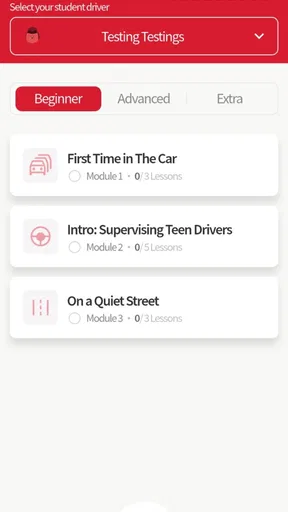
RoadReady belongs to the education category, but it feels practical rather than academic. The store summary describes its purpose plainly: it logs teen driving practice during the learner’s permit phase. In everyday use, that means the app is most relevant to families who want a simple record of supervised driving rather than another collection of lessons or quiz questions.
I would recommend it first to a learner who is practicing regularly but whose sessions feel disconnected. A short trip to the supermarket, a longer drive across town, and a weekend session on busier roads can all blur together afterward. Recording those sessions encourages a better conversation: What felt comfortable? Which situations still caused hesitation? What should the next practice drive focus on?
The app is also useful for the supervising adult. Parents and guardians often have good intentions but limited time, and that can lead to practice happening only when a convenient errand appears. A log makes it easier to notice whether driving time is balanced or whether the learner is repeatedly choosing the same familiar streets. That is a subtle but important benefit. A record is not just proof that practice happened; it can expose gaps in the practice routine.
Still, I would not treat the log as a certificate of readiness. A learner can accumulate entries without developing good judgment if every drive follows the same easy route. RoadReady works best when the person supervising uses each entry as a prompt for planning, not as a target to complete mechanically.
How quickly it fits into a driving routine
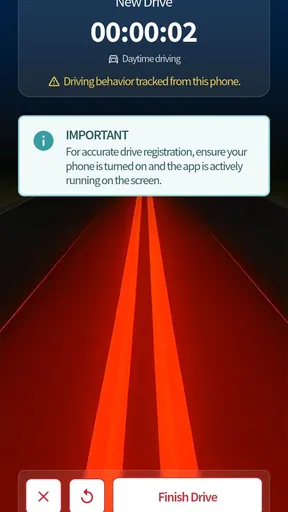
The app’s practical success depends on keeping logging from becoming a distraction. The safest routine is to prepare before moving, or to complete the record after parking. I would not interact with the phone while driving, even for a quick update. That sounds obvious, but it is especially important for a learner who is still dividing attention among steering, signs, mirrors, traffic, and instructions from the passenger seat.
For a family using it consistently, the best workflow is simple: decide before the trip what kind of practice is planned, drive without handling the phone, and review or complete the record once the car is safely parked. This turns the app into a short debrief rather than another demand during the drive. It also gives the supervising adult a chance to add context while the experience is still fresh.
I found that this approach makes the app feel faster in practice than trying to document every detail immediately. The value is not in entering information at every moment. The value is in preserving enough structure to remember what happened and decide what comes next. If a family expects the app to provide instant coaching while the vehicle is moving, it is the wrong tool and could encourage unsafe habits.
RoadReady is free, which makes it easy to try without adding a financial decision to an already expensive stage of learning to drive. It carries an Everyone content rating, so it is positioned for broad use. The application was released on May 30, 2018, and the current version is 3.4.13. Those details suggest a product that has been around long enough to serve a focused purpose, although the experience still depends heavily on whether its workflow suits a particular family.
Where it helps during heavier use
The most demanding moments are not necessarily technical. They happen when several people share responsibility for the same learning record. A teenager may believe a drive went well, while a parent remembers repeated late braking. One adult may log trips carefully, while another forgets. A useful driving log has to survive those ordinary inconsistencies.
My advice is to agree on a shared routine before making RoadReady part of the learning plan. Decide who records the session, when it is recorded, and what the family considers worth discussing afterward. Without that agreement, the app can become a box-ticking exercise or a source of arguments about missing entries. With it, the record becomes a neutral starting point for a calmer conversation.
A realistic example would be a teenager who drives to school during relatively quiet hours, then practices on a weekend when traffic is heavier. The first trip may build confidence with familiar turns, while the second reveals difficulty with lane changes or judging gaps. Logging both sessions side by side can help the supervising adult avoid saying only “you need more practice.” Instead, the next drive can have a specific purpose, such as repeating lane changes on a less intimidating road before attempting a busier route.
Another useful scenario is preparation for a change in conditions. If most entries come from daylight drives in good weather, the family can deliberately plan supervised practice at dusk or in light rain when it is safe to do so. The app does not make that decision for you, and that is precisely why the adult’s judgment remains central. Its role is to reveal the pattern that might otherwise be overlooked.
Heavy use can also expose a limitation: logging more sessions does not automatically make the record more meaningful. A dozen nearly identical short trips may tell you less than a smaller set of varied, thoughtfully reviewed sessions. I would use RoadReady to support quality practice, not to chase a large total.
Stability and day-to-day reliability
For an app with a narrow purpose, reliability means more than opening successfully. A family needs confidence that the record can be maintained without constant friction, especially when several weeks of practice are gradually building into a useful history. The public listing shows an average rating of 3.3 from around 3.7 thousand ratings, alongside roughly 2.4 thousand written reviews. That is a mixed reception rather than a universal endorsement, so I would approach it as a focused utility whose fit should be tested early.
My practical recommendation is to try it during the first few practice sessions instead of waiting until a large record has accumulated. Check whether the logging flow feels natural for the learner and supervising adult, whether both understand what is being recorded, and whether the app fits the family’s preferred timing. If the routine already feels awkward after a few drives, more entries are unlikely to solve the problem.
It is also sensible to keep the human habit stronger than the digital habit. After each session, the adult and learner should be able to summarize what happened even if the phone is unavailable. A quick spoken or written note about the main challenge can preserve the useful part of the exercise. This is not a criticism unique to RoadReady; it is a general safeguard whenever an app becomes part of an important learning routine.
That recovery mindset matters because driving practice is not always tidy. A trip may be interrupted, a planned route may change, or the learner may decide that conditions are beyond their current comfort level. The right response is not to force the session into a neat record. Stop safely, discuss the decision, and record the experience afterward if appropriate. In my view, recognizing when to pause is itself valuable driver education.
Device age and practical constraints
RoadReady supports a minimum operating system of 7.1, which makes it accessible to people using older compatible devices rather than requiring a recent phone. That can be helpful for families who reserve an older handset for a teen or do not want driving practice tied to the newest hardware. At the same time, an older device may bring its own everyday constraints, such as a smaller screen, slower general operation, or a battery that does not last as long. Those are device realities rather than reasons to use the phone while driving.
I would keep the phone secured and out of the learner’s active attention. If the supervising adult needs to handle the record, that should happen before departure or after parking. A dashboard-mounted phone may seem convenient, but convenience should not turn a logging app into a source of visual distraction. RoadReady is most sensible when it stays in the background of the driving lesson.
Resource demands are difficult to judge from the app’s purpose alone, and I would not choose it expecting it to transform an older phone into a modern navigation or coaching system. Its appeal is that logging should be lighter and less intrusive than running a feature-heavy driving platform. If your main need is live navigation, route guidance, hazard alerts, or detailed vehicle telemetry, a dedicated alternative will be more appropriate. RoadReady is about documenting practice, not replacing those tools.
There is also a social constraint that is easy to miss. A teenager may see logging as supervision or paperwork rather than help. The adult can reduce that resistance by allowing the learner to participate in reviewing the record and choosing the next goal. For example, instead of using the log to criticize every mistake, ask which part of the drive felt hardest and whether the next session should repeat or gradually extend that challenge. The app becomes more useful when it supports ownership rather than surveillance.
How it compares with ordinary alternatives
The usual alternative is a notebook, spreadsheet, or simple note on the phone. Those options can be perfectly adequate for a family that only needs a basic list of dates and practice observations. A notebook has one advantage RoadReady cannot guarantee: it is immediately understandable and does not depend on an app workflow or a compatible device. It can also be customized freely, which may suit an instructor who wants detailed comments.
RoadReady makes more sense when the family wants a dedicated place for teen driving practice rather than a general note among shopping lists and school reminders. The focused purpose can make the process easier to remember and easier to discuss. Its weakness, compared with a flexible spreadsheet, is that families may have less freedom to design exactly the categories or review system they prefer. If you enjoy building your own tracking template, a spreadsheet may feel more powerful.
Another alternative is a professional driving school. An instructor brings trained observation, structured feedback, and experience with common learner mistakes. RoadReady cannot provide that human judgment. I would use the app alongside professional instruction if the budget allows, not in place of it. The log can help a family remember what was practiced between lessons, while the instructor can identify issues that a simple record will never reveal.
Navigation and driving-analysis apps are different again. They may focus on directions, routes, alerts, or vehicle behavior, while RoadReady focuses on the learning record. Combining too many tools can make the phone more distracting and the process more complicated. For a new driver, a simple, repeatable routine is usually better than a crowded dashboard of features.
Who should use it, and who should skip it
I think RoadReady is a good match for a teenager in the learner’s permit phase whose parent or guardian wants practice to be consistent and reviewable. It is especially suitable for families that already discuss driving after each session but need a better way to remember progress and identify missing situations. Because it is free and has more than 500 thousand installs, it is also an easy low-risk option to test before considering paid instruction or more elaborate tracking tools.
I would skip it if you want interactive driving lessons, a virtual instructor, navigation, or instant safety warnings. I would also skip it if the family is unwilling to maintain a shared logging habit. In that case, a small paper checklist may be less frustrating and just as effective. The app cannot create commitment where there is no agreement about who will use it and why.
It may also be a poor fit for a learner who becomes anxious when every drive feels formally scored. The record should support reflection, not make ordinary mistakes feel like permanent failures. If the teenager is more open when talking informally with the supervising adult, keep that conversation central and use the app only when it genuinely helps.
My verdict on speed, stability, and overall value
RoadReady is best understood as a focused education utility, not a complete driver-training system. Its perceived speed comes from a narrow job: helping a family organize practice rather than delivering a large set of demanding tools. Its usefulness during heavier use depends on a clear household routine, and its reliability should be judged by whether that routine remains easy after several sessions. The practical recovery plan is simple: log only when safely parked, keep the main learning conversation human, and do not confuse a complete record with complete readiness.
Safe Roads Alliance, Inc. has created something that addresses a real but easily ignored part of learning to drive. Practice often happens in fragments, and fragments are hard to evaluate. A dedicated log can turn those fragments into a more deliberate plan, particularly when the adult uses it to vary routes, conditions, and goals instead of merely counting trips.
My final opinion is positive but measured. I would recommend trying RoadReady if you want a free, purpose-built way to organize supervised teen driving practice and you are willing to review the entries thoughtfully. I would not recommend relying on it as proof that a learner is ready for independent driving. The app is most valuable when it quietly supports better conversations, better planning, and safer repetition. Used that way, it earns a place in the learning routine; used as a substitute for instruction or judgment, it falls well short.
Verdict
Strengths of RoadReady
- Covers essential vehicle checks before starting a trip.
- Helpful for new drivers learning basic road-safety habits.
- Simple checklist format makes inspections quick to follow.
- Can encourage more consistent vehicle maintenance routines.
- Useful reference for driving lessons and practice sessions.
Limitations of RoadReady
- Some guidance may vary depending on local driving regulations.
- Does not replace a professional mechanic’s vehicle inspection.
- Checklist content may feel basic for experienced drivers.
- Requires users to remember to open the app before each trip.
- Limited value if your vehicle type or region is not supported.
Other Releases by Safe Roads Alliance, Inc.
View All
RoadReady Ohio
Auto & Vehicles4.2
Similar Picks in This Category
View All
Duolingo: Language Lessons
Duolingo4.7

Google Classroom
Google LLC2.8

Unacademy: Learn & Crack Exams
Unacademy3.2

Bible App for Kids
Life.Church4.4

Cake - Learn English & Korean
Cake Corp.4.7

Brainly: AI Homework Helper
Brainly4.5
Frequently Asked Questions
What is RoadReady, and what is it used for?
RoadReady is a driving-focused mobile app designed to help users organize and monitor essential information related to driving practice and road readiness. Depending on the version and platform, it may include tools for recording practice sessions, tracking progress, reviewing driving-related requirements, or preparing for a license test. It is best viewed as a planning and tracking companion rather than a replacement for professional instruction or official driving authorities.
Is RoadReady suitable for learner drivers and new drivers?
Yes, RoadReady can be useful for learner drivers who want a clearer way to organize their practice and understand their progress. The app may help users keep records, set goals, and stay aware of important driving tasks. However, completing activities inside the app does not prove that someone is ready to drive independently. Learners should still follow local licensing rules and practice with a qualified supervising driver or instructor.
Does RoadReady work offline, or does it require an internet connection?
Some RoadReady features may remain available without a constant internet connection, particularly basic record keeping or previously loaded information. Nevertheless, an internet connection may be needed for downloading the app, synchronizing data, updating content, using account-related features, or accessing location-specific information. Availability can vary between Android and iOS versions, so users should check the current store listing and test the features they need before relying on the app while traveling.
Can RoadReady replace a driving instructor, official handbook, or licensing authority?
No. RoadReady should not be treated as a substitute for professional driving lessons, an official driver handbook, or instructions provided by a local licensing authority. Driving laws, required practice hours, documentation, and test procedures differ by country, state, or region. The app can support organization and preparation, but users must verify important requirements with official sources and obtain practical guidance from a qualified instructor whenever they are unsure.
Is RoadReady free to download, and are there any privacy considerations?
RoadReady may be available as a free download, although certain features, upgrades, or services could require payment depending on the platform and current version. Before installing, review the app-store description for subscriptions or in-app purchases. Also check the privacy policy to understand whether the app collects account details, driving records, location information, or usage data. Avoid entering sensitive information unless you are comfortable with how it is stored and used.
